Our Services


AI Workload Optimization
Your AI models are running — but they're burning through GPUs like there's no tomorrow. We optimize inference, quantize models, and tune your serving stack until you get 2–5× more throughput on the same hardware. No retraining. No quality loss.

The problem
You're paying for GPUs you don't need.
Most AI workloads run on default configurations. No quantization, no batching optimization, no inference tuning. The model works — but it's using 4× the memory and 3× the compute it actually needs.
Hardware vendors love it. They sell you their most expensive GPU configuration because "AI needs it." The truth is: with proper optimization, most workloads run on a fraction of the hardware. You're not compute-bound — you're optimization-bound.
Every month you wait, you're paying for GPUs that are sitting 70% idle.
How we fix it
Four steps to lean AI.
Profile your workload
We measure your current models, GPU utilization, memory footprint, latency, and throughput. You see exactly where performance is being left on the table.
Select & benchmark models
We test open-source alternatives against your current setup. Same quality bar, fraction of the compute. If a smaller model matches your output quality, we switch.
Optimize & quantize
Model quantization, KV-cache tuning, batching strategies, TensorRT compilation. We extract every last FLOP from your hardware.
Deploy & validate
A/B testing against your production baseline. We don't ship until throughput, latency, and output quality all pass your acceptance criteria.
What you get
Measurable results, not promises.
Mission report
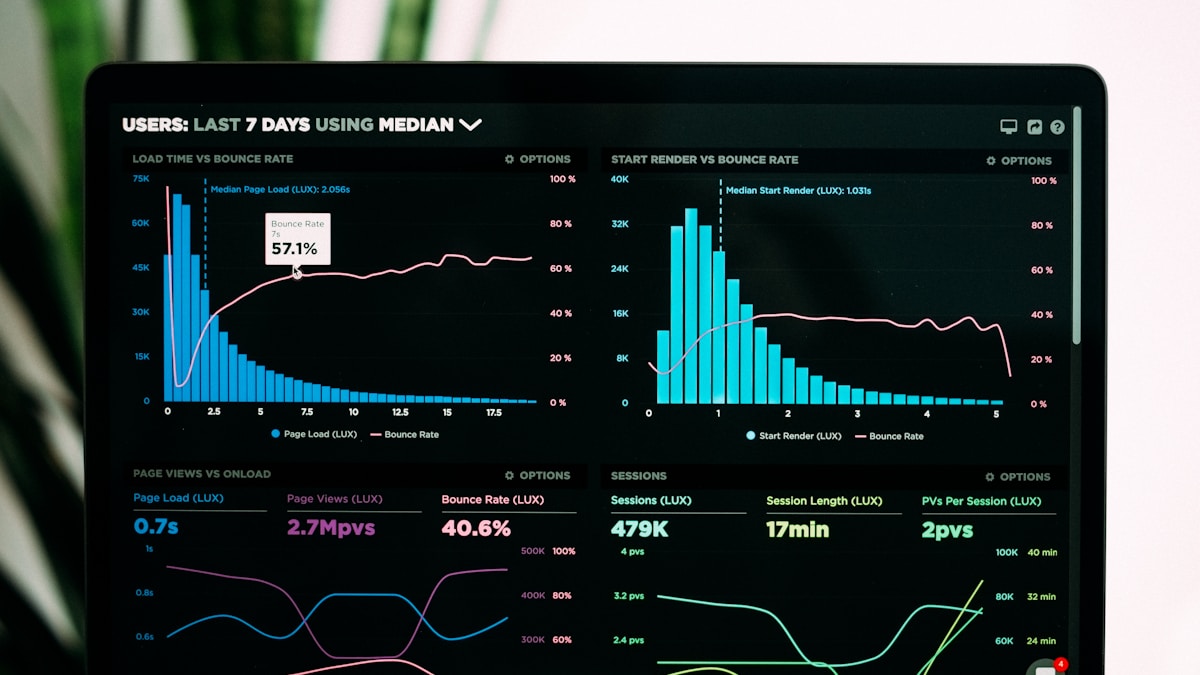
"Same models, 5× throughput, 4× context window — in a single week."
Under the hood
Open-source optimization stack.
No black boxes. Every tool is auditable, replaceable, and yours.

vLLM
High-throughput LLM serving with PagedAttention — we tune it to squeeze maximum throughput from your hardware.
Inference Engine
NVIDIA TensorRT
We use TensorRT to compile and optimize your models for maximum GPU utilization — often doubling inference speed.
Inference Optimization
Hugging Face
Access to 500,000+ open-source models. We benchmark, select, and fine-tune the right one for your use case.
Model Hub
DVC
Version control for ML models and data. We track every experiment, dataset, and model artifact so optimization is reproducible and auditable.
Model TrackingCommon questions about workload optimization.
Will optimization reduce the quality of our model outputs?
No. We benchmark every optimization step against your production baseline. Quantization, pruning, and compilation are only applied when output quality stays within your acceptance threshold. If a change drops quality, we don't ship it.
How much throughput improvement can we realistically expect?
It depends on your starting point, but most workloads see 2–5× improvement. Unoptimized models running on default settings typically leave 60–80% of GPU capacity unused. We close that gap through batching, quantization, and inference engine tuning.
Do we need to retrain our models?
Almost never. Most gains come from inference optimization — quantization, better serving configurations, and hardware-specific compilation. If we do recommend a model swap, it's to an open-source alternative that matches your quality at a fraction of the compute.
We're using Ollama — is that okay?
Honestly? No. Ollama is great for local experimentation, but it's up to 4× slower than vLLM for production inference. That means you're leaving performance on the table — performance you already paid for with your hardware. On top of that, Ollama only supports a subset of the OpenAI API, which limits integration options. We migrate you to a proper production stack, handle full OpenAI API compatibility, and walk you through every step of the transition.
How long does this take?
We start with quick wins in the first week — profiling your workload, fixing obvious bottlenecks, and switching to optimized serving defaults. From there, we iterate week by week: quantization tuning, batch optimization, KV-cache configuration, and hardware-specific compilation. Each sprint delivers measurable throughput gains until your GPUs are running at full capacity.
What if we're already using vLLM or TensorRT?
Good start — but default configurations rarely extract full performance. We've seen teams running vLLM with default batch sizes, no quantization, and suboptimal KV-cache settings. There's almost always 2–3× left on the table even with the right tools.
Let's profile your workload.
30 minutes, no pitch deck. We'll measure your current GPU utilization and show you exactly how much compute you can reclaim.